Shopify Theme Detector — What Shopify Theme Is This?
Paste any Shopify store URL to instantly detect which theme it uses — name, version, developer, and full technical details. Free Shopify theme checker, no account required.
How It Works
Three steps. Under two seconds.
01
Enter a store URL
Paste any Shopify store URL into the field above. Works with any public-facing storefront — no login or access required.
02
We analyze the store
The detector scans the store's source using 11 detection methods, cross-referencing a database of 268+ official themes to identify the theme precisely.
03
See the results
Get the theme name, version, developer, Online Store 2.0 status, shop domain, and additional technical metadata — instantly.
What the Shopify Theme Checker Reveals
Every detection returns a full technical profile of the theme running the store.
Theme Information
- ✓ Theme name and variant
- ✓ Exact version number
- ✓ Theme developer / author
- ✓ Official vs custom theme
Store Details
- ✓ Shop domain (.myshopify.com)
- ✓ Store ID and country
- ✓ Theme Store ID (if official)
- ✓ Detection method used
Technical Specs
- ✓ Online Store 2.0 compatibility
- ✓ Theme role (main / unpublished)
- ✓ Internal theme ID
- ✓ Additional metadata
Popular Shopify Themes We Detect
The detector identifies every theme on the Shopify Theme Store, plus custom builds. Here are some of the most commonly detected themes.
Dawn
Shopify's official free theme. Clean, minimal, fast. The most common theme detected across new stores.
Debut
An older free Shopify theme still running on many established stores. A common legacy detection.
Prestige
Premium theme by Maestrooo. Popular with fashion, beauty, and luxury brands for its editorial layouts.
Impact
By Maestrooo. High-converting layout popular with dropshipping and DTC brands that prioritize bold product presentation.
Impulse
By Out of the Sandbox. Built for large catalogs and promotional stores with strong filtering and merchandising.
Expanse
By Out of the Sandbox. Feature-rich and highly customizable, favoured by mid-to-large stores.
Bullet
By OpenThinking. Premium theme built for visual brands — fast, editorial, conversion-focused. Strong fit for beauty, jewelry, and lifestyle.
Etheryx
By OpenThinking. Premium theme built for clothing, fashion, and editorial brands with campaign-driven merchandising.
Why Use a Shopify Theme Detector?
People use this tool for three main reasons: competitive research, theme discovery, and technical audits.
For Store Owners
Competitive Research
See which theme a competitor's store runs. Understand what's driving their design before making your own decisions.
Theme Discovery
Found a storefront you like? Detect the theme and go straight to the source instead of guessing.
Pre-Purchase Due Diligence
Checking the theme before acquiring a store tells you how much rework to expect.
For Designers & Developers
Migration & Redesign Projects
Know what a client's store is built on before scoping a migration or rebuild.
Design Research
Identify which themes are behind storefronts you admire — useful when pitching new directions to clients.
Technical Audits
Check whether a store runs OS 2.0, legacy templates, or a heavily modified custom build.
For Shopify Partners
Prospect Research
Spot merchants running outdated or legacy themes — the ones most likely to need a redesign or upgrade.
Client Benchmarking
Compare what themes are common in a client's niche before recommending one.
Theme Recommendations
Back your suggestions with real data on what similar stores actually use.
How to Find What Shopify Theme a Website Is Using
The detector above is the fastest method. If you want to check manually, here is how.
Method 1: Use this detector
- Copy the URL of the Shopify store you want to check
- Paste it into the field at the top of this page
- Click Detect — results appear in under two seconds
Works on any public Shopify store. Returns theme name, version, developer, OS 2.0 status, and more.
Online Store 2.0 vs Legacy Shopify Themes
The detector flags whether a store runs an OS 2.0 theme or a legacy template — here is why that matters.
Online Store 2.0
Introduced in 2021. Sections and blocks on every page type, JSON templates, native metafield editing in the theme editor.
- ✓ Sections on any page type
- ✓ App blocks without code
- ✓ Metafield editing in the theme editor
- ✓ JSON templates for full flexibility
- ✓ Actively developed and supported by Shopify
Legacy Themes
Built before Shopify 2.0. Liquid-based, sections limited to the homepage, harder to customise without code.
- ✗ Sections on homepage only
- ✗ Apps require code injection
- ✗ No native metafield editor
- ✗ HTML templates, less flexible
- ✗ No longer updated by Shopify
Bullet and Etheryx are both Online Store 2.0 themes — full section flexibility, app block support, and active development from OpenThinking.
What Makes a Good Shopify Theme?
Once you know which theme a store uses, you may want to evaluate whether it is right for your store. Here is what separates strong themes from average ones.
Performance fundamentals
- Page speed — themes with clean, minimal JS load faster and convert better. Check Core Web Vitals scores before buying.
- Mobile experience — over 60% of Shopify traffic is mobile. The theme must feel native on small screens, not just shrunk.
- Online Store 2.0 — legacy themes limit what you can do without a developer. OS 2.0 gives full section control on every page.
- App compatibility — the theme should support app blocks so review apps, upsell tools, and loyalty widgets integrate cleanly.
Industry and brand fit
- Fashion & clothing — collection storytelling, lookbooks, editorial grids
- Beauty & cosmetics — clean product layouts, strong imagery, ingredient detail
- Jewelry & accessories — zoom, variant clarity, editorial product pages
- Art & photography — gallery layouts, generous whitespace, minimal chrome
- Home decor & lifestyle — room-context imagery, calm editorial aesthetics
- Streetwear & footwear — bold grids, drop-ready, fast purchase path
Not sure which theme fits your store? Compare Shopify themes by industry or browse Bullet and Etheryx — premium themes built for visual brands by OpenThinking.
When to Change Your Shopify Theme
Detecting that a competitor recently changed themes can signal a replatform or rebrand. Here are the common reasons stores switch.
Performance problems
- Slow load times above 3 seconds
- Poor Core Web Vitals scores
- Broken mobile experience
- High bounce rate from product pages
Design limitations
- Legacy theme with no OS 2.0 support
- Cannot add sections to non-homepage pages
- Design no longer matches the brand
- App integrations require code injection
Business growth
- Expanding into new markets or categories
- Moving to Shopify Plus
- Brand redesign or repositioning
- Needing stronger merchandising for a larger catalog
Frequently Asked Questions
What is a Shopify theme detector?
A Shopify theme detector is a free online tool that identifies which theme any Shopify store is running. It reads the store's publicly available source code and returns the theme name, version, developer, Online Store 2.0 status, and technical metadata — in seconds.
How do I find out what Shopify theme a website is using?
Paste the store URL into the detector above and click Detect. Results appear in under two seconds.
Can I detect custom Shopify themes?
Yes. The detector identifies both official Theme Store themes and custom builds. For custom themes, it indicates whether the theme is a modified version of an existing theme or a fully custom build.
Is the Shopify theme detector free?
Yes. Completely free, no registration required. Enter any Shopify store URL and get instant results.
How accurate is the theme detection?
The detector uses 11 different detection methods and cross-references a database of 268+ official Shopify themes. It accurately identifies the large majority of themes, including official, premium, and third-party builds.
What information does the detector reveal?
Theme name, version, theme ID, Theme Store ID, designer attribution, shop domain, store country, store ID, Online Store 2.0 compatibility, theme role, and additional technical metadata.
Is it legal to detect which Shopify theme a store uses?
Yes. The detector reads publicly available information from the store's frontend source — the same data any browser can access. No private store data, admin credentials, or backend systems are involved.
Can Shopify stores hide their theme?
Stores can rename or obfuscate theme details, but most themes still leave detectable identifiers in the page source. Heavily customised or purpose-built custom themes may show as a custom build rather than a specific theme name.
What is a Shopify theme?
A Shopify theme controls the visual design, layout, and storefront functionality of a Shopify store. Themes are available from Shopify's official Theme Store (both free and paid) or from independent developers. Premium themes typically offer more design flexibility, stronger performance, and more advanced ecommerce features than free options.
Does the detector work on all Shopify stores?
The detector works on any publicly accessible Shopify storefront. Password-protected stores, stores under maintenance mode, or stores blocking external requests may return limited results.
Can I find out if a store uses Bullet or Etheryx?
Yes. When the detector identifies a Bullet or Etheryx store, it shows the designer attribution with a direct link to explore those themes on the OpenThinking site.
Found a Theme You Like? Explore What's Available.
Once you know what theme a competitor uses, you can make a more informed choice for your own store.
OpenThinking Themes
Bullet and Etheryx — premium Shopify themes built for visual brands. Fast, editorial, and conversion-focused. Work with the team behind them.
Shopify Themes by Industry
Find the right theme for your store type — fashion, beauty, jewelry, home decor, and more. Includes fit guidance, demos, and direct Theme Store links.
Outgrowing Dawn?
If competitors are running Dawn and you want to differentiate, see when upgrading to a premium Shopify theme makes commercial sense.
Want a theme that actually converts?
These aren't just themes. They're conversion machines built by designers who obsess over every pixel and every click.

Bullet
The fastest theme on Shopify. Period.
Optimized for mobile-first shopping with instant page loads, sticky add-to-cart, and seamless checkout flow. When every millisecond counts, Bullet delivers.
Explore Bullet ↗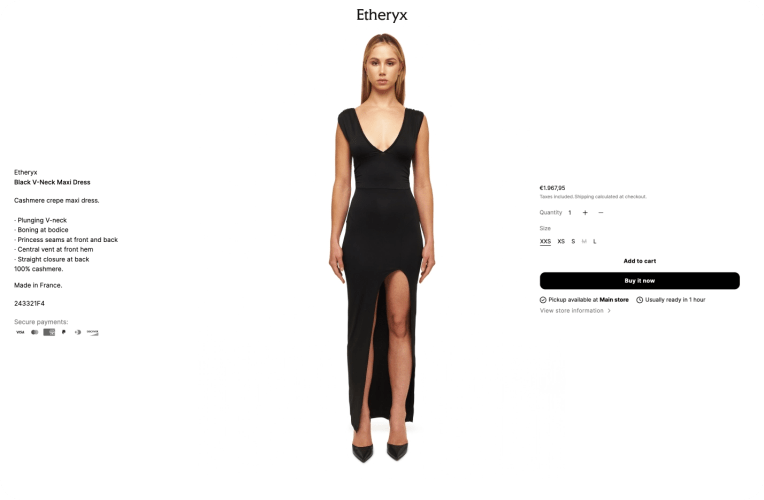
Etheryx
Premium design meets lightning performance.
Built for high-volume stores with advanced filtering, mega-menus, and instant load times. Conversion-optimized layouts turn browsers into buyers.
Explore Etheryx ↗